Permissions
Give users access to data and features
Use the Permissions app to control who can access your data and features. Restricting access to sensitive information is essential. Front-line workers rarely need the data their managers rely on, and external contractors shouldn't have access to internal records or the data of other contractors. New users have no permissions by default, so they can only access what you allow.
Permissions aren't only about security. By limiting a user's access to certain data and features, you can streamline their experience, removing clutter and distractions so they can focus on the tasks that matter to them.
Use the Permissions Explorer to create roles and groups that align with your organisation's structure and operations. For each group, you can grant varying levels of access to objects across a range of categories, including map layers, item forms, workflows and items of specific designs/interfaces.
Manage the users in your company: create, disable and delete accounts as needed. Add users to roles and groups to grant them permissions. Add them to teams so they can receive assigned tasks.
Create access policies to filter the items available to groups based on each item's attribute values.
The Permissions app is primarily intended for admin users.
Navigation
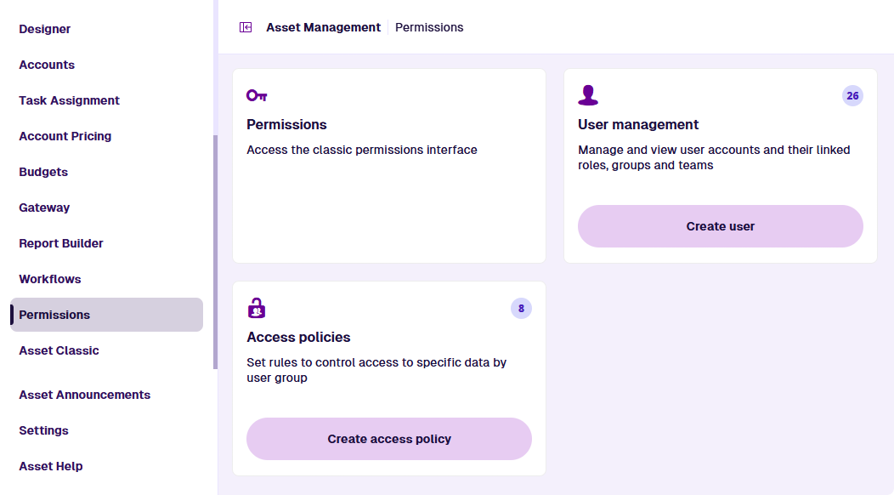
The app's start screen displays the areas you can manage:
-
Permissions - use the Permissions Explorer to manage group access to features and items of designs/interfaces.
-
User management - manage user accounts and their membership of roles, groups and teams.
-
Access policies - extend your permissions by restricting access to items based on their data.
To return to this screen at any time, select Permissions in the left panel or the Overview page.
How to access
To open the Permissions app: