Overview
Concepts at a glance
The Permissions app lets admins control what users can see and do in CausewayOne Asset Management. To get started, familiarise yourself with these concepts.
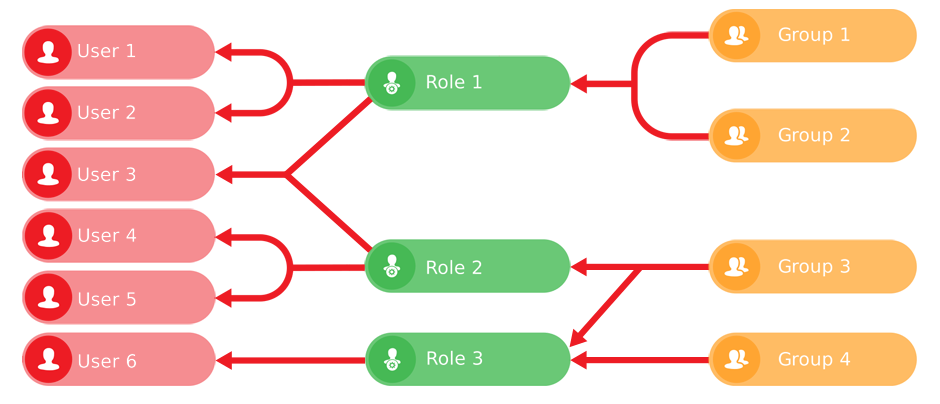
Users belong to roles and groups
A user with no memberships has no permissions. To grant them access to features and data, add them to roles (or directly to groups).
Users can also belong to teams, so they can receive assigned tasks.
Manage users and their memberships in User management.
Groups carry the actual permissions
A group is a set of permissions for objects across various categories, e.g. Designs, Interfaces, Layers, Basemaps, Item forms.
You can configure a group to have No access, Read-only or Read and write access to specific category objects. Designs and interfaces have separate Create / Read / Edit / Delete permissions and per-attribute overrides.
For example, a Bench Editors group could grant edit access to items of the Benches design, but with only specific attributes editable.
Roles, users and access policies all rely on groups for permissions. They don't store any themselves.
Roles bundle groups together
A role is a bundle of groups. If you add a user to a role, they inherit the combined permissions of those groups. This avoids the hassle of adding users to multiple groups. Future maintenance is also easier, as any changes to those groups apply instantly to users with the role.
For example, a Highways Inspector role could include the Carriageway Viewers, Defect Managers and Mobile Users groups.
Use roles to grant access to positions or personas in your organisation.
Access policies filter items by their data
Group permissions apply to all items of a design or interface. An access policy narrows that down by attribute value.
For example, an A1 Contractors group could have access to items of the Street Lights design, but only within a specific area.
Access policies refine permissions; they don't replace them. If a group doesn't have Read permission for a design or interface, an access policy has no effect.