Asset Query Syntax (AQS)
Query your asset management data
Asset Query Syntax (AQS) is the query language of CausewayOne Asset Management. You'll come across it whenever you configure a feature that needs to fetch specific items, e.g. building a report, styling a map layer, filtering a workflow.
You can also use the Data Explorer to run any query, view the item results as a table, browse their attribute data and perform bulk actions.
What can a query do?
An AQS query can:
-
fetch items of a design/interface and return their attribute data
-
filter queried items based on one or more conditions:
- Is the value of this attribute less than X?
- Do any attributes contain this text?
- Is the item located within this geographical area?
-
follow Link attributes to read data about connected items:
- What defects does each Benches item have?
- What jobs were raised from each Highway Inspections item?
- What team is responsible for each Litter Bin item?
-
count items and calculate statistics for specific attributes:
- What's the total number of Street Cleaning Jobs raised this month?
- How many Trees items in this area have root damage?
- What's the maximum column height of all Street Lights items?
Job query ideas
For example, consider the Jobs interface. Here are some queries that are possible:
- fetch jobs that are High priority and In Progress
- fetch jobs that were raised between 15 March 2026 and 30 April 2026
- fetch jobs that are estimated to end in the next 14 days
- fetch jobs that fix registered defects
- fetch jobs with long descriptions or that contain a keyword
- see which teams jobs are assigned to (including those with none set)
- count the jobs in a specific area
Build visually
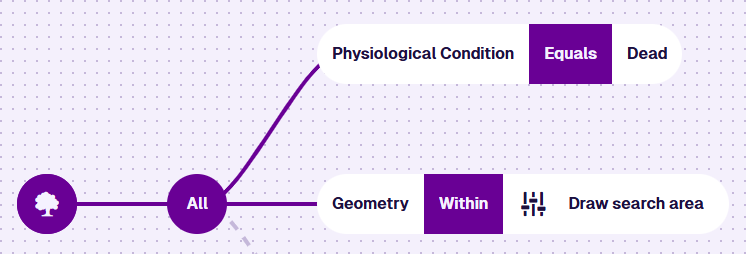
No need to write any code! The AQS Builder lets you assemble a query visually, one piece at a time.
Every query starts with a root node, which fetches an initial set of items. To narrow down the results, add child nodes that define conditions for items to satisfy. You can combine multiple conditions in logical branches, requiring items to meet any or all of them.
At each step, the builder only offers node types that fit what you're building, so you don't end up with an invalid query.
Contents
AQS Builder
A visual query editor
Build a query
How to use the AQS Builder
Root node
Configure query properties
Child node types
Filter query results
AQS parameters
Define placeholders for future values
Examples
Follow step-by-step instructions
Prefer to write code? You can write AQS queries in JSON and run them via the Alloy API. See the Developer Docs.