Item and Global Unique Code
Choose specific items or designs
Each node represents specific entities by storing their unique identifiers:
-
Item - one or more items, using their Item id property, e.g.
5c8bdfb58ae862230019dc1f -
Global Unique Code - one or more designs, using their Design code property, e.g.
designs_streetLights
You can use Item to check whether a Link attribute references specific items.
If your query targets an interface, it probably fetches items from multiple designs. Use Global Unique Code to filter those items down to specific designs.
Usage
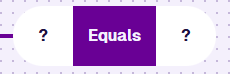
These nodes are inputs, so you can add them to the segments of:
Compatibility
These nodes each fill one segment. The other must hold a reference node of the same value type.
| Node | Accepted Value Type | Notes |
|---|---|---|
| Attribute | Item Id | Use the Pathfinder to choose a Link attribute, on the queried item or a linked item |
| Property | Item Id, Design code | Use the Pathfinder to choose a property, on the queried item or a linked item |
Options
Select a node to access its options:
- Delete - remove the node from the segment.
- Parameter - select a compatible parameter to use as a placeholder. The value is provided when the query runs.
Alternatively, select the relevant field:
-
Items - select one or more items to compare. Defaults to the queried design/interface. If compared with a node that references a linked item, only items of its design can be selected.
-
Choose your Designs - select one or more designs to compare.
Examples
Item
Fetch all teams except for these three.
In AQS terms:
Fetch items of the Teams design where their Item id property does not equal the Item id of these three Team items.

See JSON code
This code may reference designs, interfaces, attributes or items that don't exist in your company project.
{
  "type": "Query",
  "properties": {
    "collectionCode": "Live",
    "dodiCode": "designs_teams"
  },
  "children": [
    {
      "type": "NotEquals",
      "children": [
        {
          "type": "ItemProperty",
          "properties": {
            "itemPropertyName": "itemId"
          }
        },
        {
          "type": "AlloyId",
          "properties": {
            "value": ["5e1da8cbca31500dc4af3b1e", "5e1da8d7ca315011c0f2b05c", "5e1da8e1ca31500a709142eb"]
          }
        }
      ]
    }
  ]
}
Global Unique Code
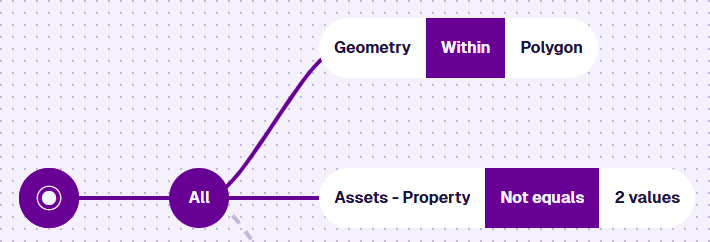
Fetch all assets in this area except for street lights and bollards.
In AQS terms:
Fetch items of the Assets interface where their Geometry attribute is within a defined area, AND where their Design code property isn't Street Lights or Bollards.
See JSON code
This code may reference designs, interfaces, attributes or items that don't exist in your company project.
{
  "type": "Query",
  "properties": {
    "collectionCode": "Live",
    "dodiCode": "designInterfaces_assets"
  },
  "children": [
    {
      "type": "And",
      "children": [
        {
          "type": "GeomWithin",
          "children": [
            {
              "type": "Attribute",
              "properties": {
                "attributeCode": "attributes_itemsGeometry"
              }
            },
            {
              "type": "Geometry",
              "properties": {
                "value": {
                  "type": "Polygon",
                  "coordinates": [
                    [
                      [-1.528451, 52.291276],
                      [-1.532371, 52.290544],
                      [-1.535095, 52.288647],
                      [-1.534088, 52.28752],
                      [-1.527428, 52.290062],
                      [-1.528451, 52.291276]
                    ]
                  ]
                }
              }
            }
          ]
        },
        {
          "type": "NotEquals",
          "children": [
            {
              "type": "ItemProperty",
              "properties": {
                "itemPropertyName": "designCode"
              }
            },
            {
              "type": "Guc",
              "properties": {
                "value": ["designs_streetLights", "designs_bollards"]
              }
            }
          ]
        }
      ]
    }
  ]
}