App settings
Customise your app experience
Alloy Mobile has various settings that you can change to suit your preferences.
To access the settings, open the Main menu , scroll down and select Settings.
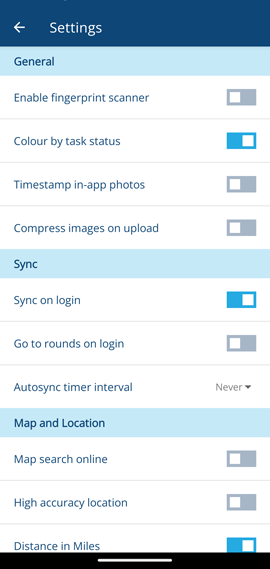
App settings are per-device. They don't synchronise with your user account.
General
-
Enable fingerprint scanner - use your device's fingerprint scanner to log in, if it has one! Disabled by default.
-
Colour by task status - colour tasks according to their status, instead of their design colour. Enabled by default.
-
Timestamp in-app photos - imprint a timestamp on photos taken directly with Alloy Mobile (not added from Files or Gallery). The format is YYYY-MM-DD hh:mm:ss. Disabled by default.
-
Compress images on upload - any JPEG images you attach to tasks/assets will be compressed to 85% quality before being uploaded. Disabled by default.
Sync
-
Sync on login - automatically synchronise after logging into Alloy Mobile. Enabled by default.
-
Go to rounds on login - automatically show the Rounds panel immediately after logging into Alloy Mobile. Ideal for vehicle-based users! Disabled by default.
-
Autosync timer interval - automatically synchronise at regular intervals. Disabled by default.
Syncing frequently will increase your data usage and may incur additional carrier costs.
Map and Location
-
Map search online - the Search Here button will show all assets/tasks in the displayed map area, not just the ones you've got synchronised. Disabled by default.
-
High accuracy location - use GPS in addition to Wi-Fi, Bluetooth and phone towers to improve your location accuracy. Disabled by default.
Using GPS will drain your device's battery faster.
- Distance in miles - use miles for distance units instead of kilometres. Enabled by default.
Support
- Share logs - if you're experiencing issues, select to download and share a zip archive of the app's log files. To email this to us for analysis, share it with your device's email app.