Connected To
Check whether items are linked together
Each node takes a single input to filter the queried items.
-
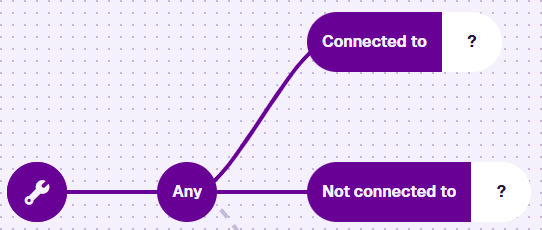
Connected to - items qualify if they're linked to at least one matching item.
-
Not connected to - items qualify if they're not linked to any matching item.
Usage
These nodes are conditions, so you can add them directly after the root node or a logical node.
Compatibility
The single segment must hold an Item node, referencing the Link attribute to check.
Select the node and then Open in Pathfinder. Use the Pathfinder to perform one or more "hops" to visit a linked design/interface, then choose the Link attribute to check there.
This Item node is different to the value node variant, despite sharing its name and icon.
Options
Select the node to access its options:
-
Swap - use another comparison node. If any segments are populated, only compatible nodes are listed.
-
Delete - remove the node from the query branch.
Examples
Connected to
Fetch all defects that have reporters.
In AQS terms:
Fetch items of the Defects interface where their Reporters Link attribute is populated by at least one item of the Contacts design.

See JSON code
This code may reference designs, interfaces, attributes or items that don't exist in your company project.
{
  "type": "Query",
  "properties": {
    "collectionCode": "Live",
    "dodiCode": "designInterfaces_defects"
  },
  "children": [
    {
      "type": "ConnectedTo",
      "children": [
        {
          "type": "Item",
          "properties": {
            "path": "root.attributes_defectsReporters"
          }
        }
      ]
    }
  ]
}
Not connected to
Fetch all inspections with no raised jobs.
In AQS terms:
Fetch items of the Inspections interface where their Raised Jobs Link attribute is not populated with any items of the Jobs interface.

See JSON code
This code may reference designs, interfaces, attributes or items that don't exist in your company project.
{
  "type": "Query",
  "properties": {
    "collectionCode": "Live",
    "dodiCode": "designInterfaces_inspections"
  },
  "children": [
    {
      "type": "NotConnectedTo",
      "children": [
        {
          "type": "Item",
          "properties": {
            "path": "root.attributes_inspectionsRaisingJobsRaisedJobs"
          }
        }
      ]
    }
  ]
}