Geographic comparisons
Check how two areas overlap
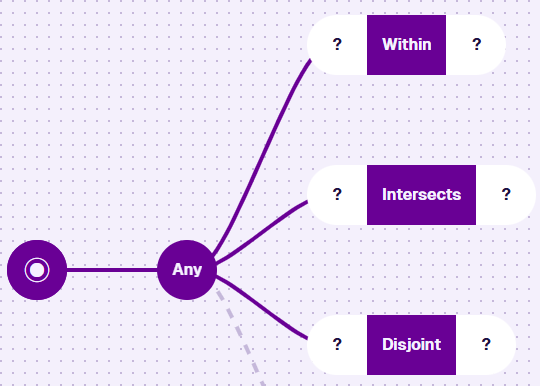
Each node takes two geometry inputs to filter the queried items.
-
Within - items qualify if the first area is completely inside the second.
-
Intersects - items qualify if the first area overlaps the second (or is inside it).
-
Disjoint - items qualify if the first area is completely outside the second.
Usage
These nodes are conditions, so you can add them directly after the root node or a logical node.
Compatibility
Both segments must hold geometry. One must be an Attribute, the other a fixed value.
| Node | Accepted Value Type | Notes |
|---|---|---|
| Attribute | Geometry | Use the Pathfinder to choose a Geometry attribute, on the queried item or a linked item |
| GeoJSON | Geometry | A fixed area you draw or enter as code |
| Value From Item Attribute | Geometry | The Geometry attribute of a specific item - see Locations of Interest for a common use |
Options
Select the node to access its options:
-
Swap - use another comparison node. If any segments are populated, only compatible nodes are listed.
-
Delete - remove the node from the query branch.
-
Link negated - invert the condition. Different from swapping to the opposite node. Only available when a segment references a linked design/interface.
Enabling this on Within or Intersects isn't the same as swapping to Disjoint (or vice versa) - see Link negated for why.
Examples
Within
Fetch all bollards within this area.
In AQS terms:
Fetch items of the Bollards interface where their Geometry attribute falls completely within the defined area.
To build this step-by-step, see Example 2 - Geographic.

See JSON code
This code may reference designs, interfaces, attributes or items that don't exist in your company project.
{
  "type": "Query",
  "properties": {
    "collectionCode": "Live",
    "dodiCode": "designs_bollards"
  },
  "children": [
    {
      "type": "GeomWithin",
      "children": [
        {
          "type": "Attribute",
          "properties": {
            "attributeCode": "attributes_itemsGeometry"
          }
        },
        {
          "type": "Geometry",
          "properties": {
            "value": {
              "type": "Polygon",
              "coordinates": [
                [
                  [-1.528451, 52.291276],
                  [-1.532371, 52.290544],
                  [-1.535095, 52.288647],
                  [-1.534088, 52.28752],
                  [-1.527428, 52.290062],
                  [-1.528451, 52.291276]
                ]
              ]
            }
          }
        }
      ]
    }
  ]
}
Intersects
Fetch all assets whose geometry overlaps with this area.
In AQS terms:
Fetch items of the Assets interface where their Geometry attribute intersects the defined area.

See JSON code
This code may reference designs, interfaces, attributes or items that don't exist in your company project.
{
  "type": "Query",
  "properties": {
    "collectionCode": "Live",
    "dodiCode": "designInterfaces_assets"
  },
  "children": [
    {
      "type": "GeomIntersects",
      "children": [
        {
          "type": "Attribute",
          "properties": {
            "attributeCode": "attributes_itemsGeometry"
          }
        },
        {
          "type": "Geometry",
          "properties": {
            "value": {
              "type": "Polygon",
              "coordinates": [
                [
                  [-1.528451, 52.291276],
                  [-1.532371, 52.290544],
                  [-1.535095, 52.288647],
                  [-1.534088, 52.28752],
                  [-1.527428, 52.290062],
                  [-1.528451, 52.291276]
                ]
              ]
            }
          }
        }
      ]
    }
  ]
}
Disjoint
Fetch all inspections outside of this area.
In AQS terms:
Fetch items of the Inspections interface where their Geometry attribute falls completely outside the defined area.

See JSON code
This code may reference designs, interfaces, attributes or items that don't exist in your company project.
{
  "type": "Query",
  "properties": {
    "collectionCode": "Live",
    "dodiCode": "designInterfaces_inspections"
  },
  "children": [
    {
      "type": "GeomDisjoint",
      "children": [
        {
          "type": "Attribute",
          "properties": {
            "attributeCode": "attributes_itemsGeometry"
          }
        },
        {
          "type": "Geometry",
          "properties": {
            "value": {
              "type": "Polygon",
              "coordinates": [
                [
                  [-1.528451, 52.291276],
                  [-1.532371, 52.290544],
                  [-1.535095, 52.288647],
                  [-1.534088, 52.28752],
                  [-1.527428, 52.290062],
                  [-1.528451, 52.291276]
                ]
              ]
            }
          }
        }
      ]
    }
  ]
}