Text comparisons
Search attributes for text
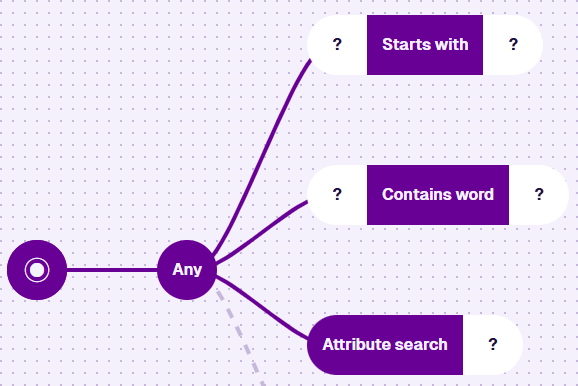
Each node takes one or two inputs to filter the queried items.
-
Starts with - items qualify if a specific attribute starts with the input text.
-
Contains word - items qualify if a specific attribute contains the input word.
-
Attribute search - items qualify if any attribute matches the input value.
Usage
These nodes are conditions, so you can add them directly after the root node or a logical node.
Compatibility
Starts with and Contains word have two segments: the attribute to search, and the text to match.
| Node | Accepted Value Type | Notes |
|---|---|---|
| Attribute | Text | Use the Pathfinder to choose an attribute, on the queried item or a linked item |
| Text | Text | A fixed line of text you enter |
| Value From Item Attribute | Text | From one or more items of any design/interface |
Attribute search has one segment: the fixed search term to look for.
Most attributes are searched automatically. Text attributes match whole words anywhere in their value. Other attribute types only match when the search term parses as an exact value of that type.
| Node | Attribute Type | Searched? | Matches | Example |
|---|---|---|---|---|
| Text | Text | Unless Searchable is disabled | Every word (any order), or exact value if under three chars | drain blocked |
| ↳ | Number | Always | Exact value | 42 |
| ↳ | Date | Always | Exact value | 15 March 2026 |
| ↳ | Date Time | Always | Exact value | 15 March 2026 14:30 |
| ↳ | Time | Always | Exact value | 14:30 |
| ↳ | Seasonal | Always | Exact value | 17 August |
| ↳ | Link | Never | Use Connected to instead | |
| ↳ | Geometry | Never | Use Within / Intersects / Disjoint instead | |
| ↳ | Yes/No | Never | Use Equals instead |
For accepted date, time, and number formats, see Flexible search terms.
Options
Select the node to access its options:
-
Swap - use another comparison node. If any segments are populated, only compatible nodes are listed.
-
Delete - remove the node from the query branch.
-
Link negated - invert the condition. Only available when a segment references a linked design/interface.
Examples
Starts with
Fetch all street lights with a unit number starting with SL/002.
In AQS terms:
Fetch items of the Street Lights design where their Unit Number attribute starts with SL/002.

See JSON code
This code may reference designs, interfaces, attributes or items that don't exist in your company project.
{
  "type": "Query",
  "properties": {
    "collectionCode": "Live",
    "dodiCode": "designs_streetLights"
  },
  "children": [
    {
      "type": "StartsWith",
      "children": [
        {
          "type": "Attribute",
          "properties": {
            "attributeCode": "attributes_streetLightingUnitsUnitNumber"
          }
        },
        {
          "type": "String",
          "properties": {
            "value": ["SL/002"]
          }
        }
      ]
    }
  ]
}
Contains word
Fetch all inspections that mention graffiti in the description.
In AQS terms:
Fetch items of the Inspections interface where their Description attribute contains the word graffiti.

See JSON code
This code may reference designs, interfaces, attributes or items that don't exist in your company project.
{
  "type": "Query",
  "properties": {
    "collectionCode": "Live",
    "dodiCode": "designInterfaces_inspections"
  },
  "children": [
    {
      "type": "WordSearch",
      "children": [
        {
          "type": "Attribute",
          "properties": {
            "attributeCode": "attributes_tasksDescription"
          }
        },
        {
          "type": "String",
          "properties": {
            "value": ["graffiti"]
          }
        }
      ]
    }
  ]
}
Attribute search
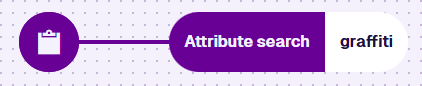
Fetch all inspections that involve graffiti.
In AQS terms:
Fetch items of the Inspections interface where any of their attributes contain the word graffiti.
See JSON code
This code may reference designs, interfaces, attributes or items that don't exist in your company project.
{
  "type": "Query",
  "properties": {
    "collectionCode": "Live",
    "dodiCode": "designInterfaces_inspections"
  },
  "children": [
    {
      "type": "GlobalAttributeSearch",
      "children": [
        {
          "type": "String",
          "properties": {
            "value": ["graffiti"]
          }
        }
      ]
    }
  ]
}