Creating asset designs
How to create a basic asset design
Overview
When you want to record a new class of assets, you need to create an asset type design that will allow you to create the assets.
The basic asset design includes the following set of interfaces that allow you to perform basic tasks.
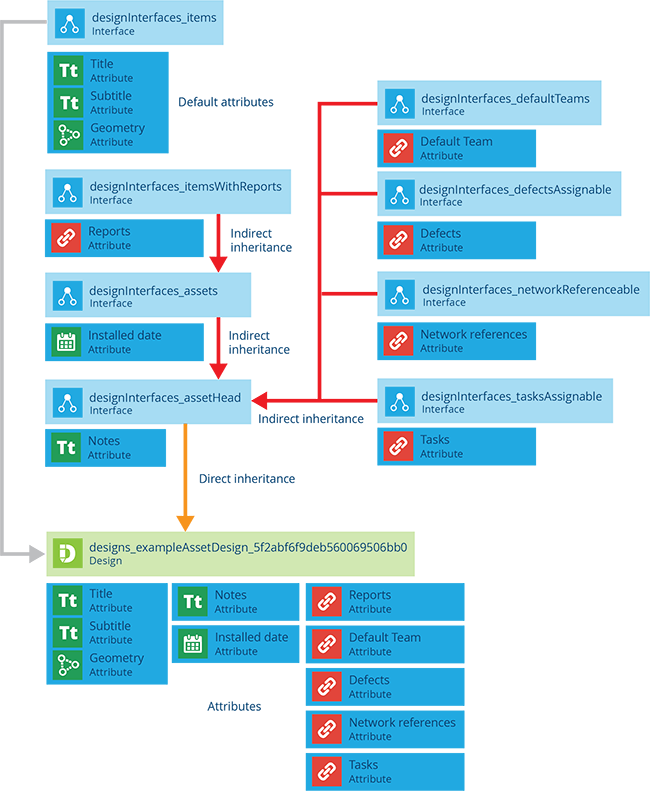
Creating an asset design
To create an asset design use the following procedure:
-
Go to the Designer module and select Create design.
-
Select the Asset type from the list of design types.
-
In the dashboard panel, complete the design form, see Creating designs.
-
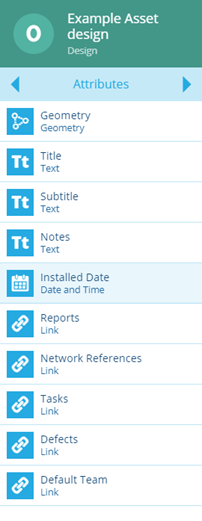
Select Create. Your new design is displayed in the right panel. A basic asset design has the following system attributes associated with it. Customise the design by adding attributes.
Depending on your permission settings, you may not be able to create designs. Contact your administrator for assistance.